Dialogs
A dialog is a separate window which can be popped up and down as needed.
A dialog provides a container to which other GUI objects can be added.
Gsharp includes a number of dialog types which provide the basis for different
dialog operations. Dialogs must be explicitly popped up and down by the
application, and the convenience functions GuiPopupDialog and GuiPopdownDialog
are provided for this purpose.
Dialogs are created just like other objects, using the create keyword
function. The dialog type, which determines its initial layout, is set
with the XuNguiDialogType resource. Since the dialog is a separate window
shell, you need to specify the size of the dialog window. This is done
by setting the geometry resources XuNguiWidth and XuNguiHeight to the
size in pixels. Here is an example of creating a message dialog and setting
these resources. The source for this example is found in the library $UNIDIR/lib/libgui.gsl:
Example: libgui.gsl function GuiInfo
function GuiInfo(string message)
  string DIALOG;
  DIALOG= "gsharp_1.information";
  if not exists($DIALOG)
  create Dialog $DIALOG
   ( XuNguiDialogType = "information",
     XuNguiTitle = "Information",
     XuNguiWidth = 350,
     XuNguiHeight = 200,
     XuNguiCallback = "GuiPopdownCB"
   );
  $DIALOG.XuNguiLabel = message;
  GuiPopupDialog(DIALOG);
endfunction
You can see this dialog by type the following command in the Gsharp Command
Area:
> GuiInfo("This is easy!'')
The result is shown in the image below.
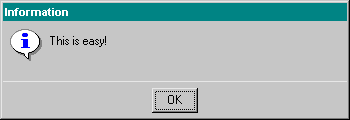
A dialog shell can be given a title using the XuNguiTitle resource, as is done is the example above. The message dialog in this example has only one button, an OK button. When pressed, the callback function GuiPopdownCB is called. This function, also found in $UNIDIR/lib/libgui.gsl, pops down the dialog object using the Gsharp builtin GuiPopdownDialog. This function is not used directly as a callback function because it does not have the parameter list required by a callback function. Once a dialog has been created, it can be popped up using the function GuiPopupDialog.
A selection dialog type enables the user to select a string from a list of strings. The selection list is assigned to an array of strings with the XuNguiListItems resource. A selection dialog can be used to complete the functionality of the example gui_lesson1.gsa, where the Page Format button on the File menu is not yet implemented. A selection dialog is created in gui_lesson4.gsa using the statement:
create Dialog $DIALOG
  ( XuNguiTitle = "Page Format",
    XuNguiDialogType = "selection",
    XuNguiListItems = "A4"//"A(Letter)"//"Window",
    XuNguiHeight = 200,
    XuNguiLabel = "Select size",
    XuNguiWidth = 400,
    XuNguiCallback = "PageFormatCB"
  );
When a selection has been, the callback function can retrieve the selected
item using the function GuiGetString. A corresponding function, GuiSetString,
can be used to set a default selection.
Many dialog types have a work area where additional GUI objects can be
placed. The next section explains the concept of a bulletin board container
and object positioning. These techniques will be used to add additional
functionality to the Page Format dialog discussed above.
Carry on to Positioning GUI Objects