Setting GUI Object Resources
GUI resources are set in exactly the same way as graphics object resources; with the create command, with the set command, or in an assignment statement. The code shown in A simple example uses only default resource settings. The next example creates a similar GUI hierarchy, but this time sets resources to give the Menu and Button objects more meaningful names and functionality. The example sets resources using both an assignment statement and during object creation. The complete code for this and other GsharpApp examples can be found in the directory $UNIDIR/example/GsharpApp.
Example: gui_lesson1.gsa creating a simple GUI
gsharp_1.XuNguiTitle = "My First Gsharp App";
create Menubar gsharp_1.menubar;
create Menu gsharp_1.menubar.menu_1
  ( XuNguiLabel = "File"
  );
create Button gsharp_1.menubar.menu_1.button_1
  ( XuNguiLabel = "Page Format...",
    XuNguiSensitive = false
  );
create Separator gsharp_1.menubar.menu_1.separator_1;
create Button gsharp_1.menubar.menu_1.button_2
  ( XuNguiLabel = "Exit",
    XuNguiCallback = "GuiFileExit"
  );
create Canvas gsharp_1.canvas;
#turn off info messages and run an example
set_messages(true,true,false,true);
exec("$UNIDIR/example/Gsharp/climb1.gsl");
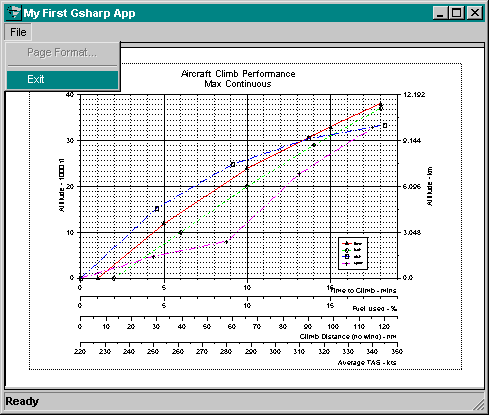
Notice that the window title has been set by setting the title of the root object gsharp_1. Menu and button labels are set with the resource XuNguiLabel. A callback function has been set for the Exit button so that selecting File->Exit causes a callback to the builtin function GuiFileExit and terminates Gsharp. No callback has been associated with button 1 yet, and for this reason it is set insensitive which gives the button a dimmed appearance and makes it inoperable. When executed, this program produces the GUI and graph shown below.
Carry on to Callback Functions