A simple example
A simple GSL programming example will show how Gsharp user interfaces are created. For this example, the following GUI object hierarchy will be defined:
Panel Menubar Command Menu Button
A Panel object is always the top level GUI object. The panel is created
automatically and is named gsharp_1. Only one Panel object can exist in
an application and it cannot be destroyed.The GSL code to create the remainder
of the interface hierarchy shown above is given in the following example:
Example: A simple GUI
create Menubar gsharp_1.menubar;
create Menu gsharp_1.menubar.menu_1;
create Button gsharp_1.menubar.menu_1.button_1;
create Canvas gsharp_1.canvas;
create Command gsharp_1.command;
GUI object instance names follow the Gsharp naming convention. In this example lower case names reflecting the object class were chosen. To ensure unique object names, a numeric identifier has been appended to the name when multiple class instances can occur for a given parent, as is the case with the Menu and Button object classes.
When executed with the command:
Gsharp <filename>.gsa
the user interface shown below is generated:
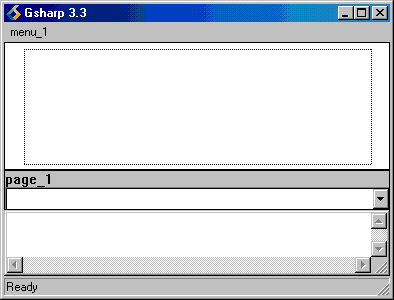
Pressing MB1 over menu_1 pulls it down and exposes button_1. If you select
button_1, you will notice that nothing happens.This is because no callback
function has been associated with the Button object. If run, you will
have to use the close button provided by the Window Manager to terminate
this application.
Notice in the command above that the file extension ".gsa'' was used.
This file extension signals that the GSL script is a complete application.
Gsharp will not create its own GUI when a file with extension ".gsa''
is run from the command line.
Carry on to Creating and Destroying GUI Objects