| Syntax: | pause(float x) |
| Description: | Delay execution of pause
for x seconds
|
| Code sample: |
repaint; pause(0.5); reset all; |
polyfit - fit polynomial to scatter points
| Syntax: | float polyfit(float x, float y, float nodes, float degree) |
| Description: | Fit a 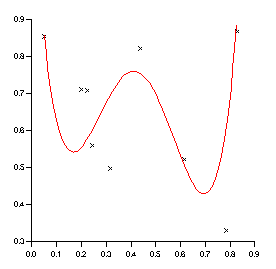 polynomial of degree up to 5
to the points (x,y). Calculate the polynomial at the
x values specified by nodes. polynomial of degree up to 5
to the points (x,y). Calculate the polynomial at the
x values specified by nodes.
This function is described in the section: How do I fit a line? |
| Code sample: |
x = rnd(10);
y = rnd(10);
newx = range(x,100); newy = polyfit(x,y,newx,4); |
| See also: | spline, smooth, linear, range |
polynomial - triangulation based interpolation
| Syntax: | float polynomial(float x, float y, float z, float xGrid, float yGrid, float smoothing) |
| Description: |
Interpolate 2D scattered data onto a grid using triangulation based point gridding. The method:
This method is fully described in A Method of Bivariate Interpolation and Smooth Surface Fitting for Irregularly Distributed Data Points by Akima, H. (1978).
|
| See also: | bilinerar, bivariate, fault, range |
print - print page to current printer
| Syntax: | |
| Description: | Print current page to current
printer
|
| Examples: |
function PrintAllPages()
  string PAGE;
  for PAGE in all("Page")
    scope $PAGE;
    print;
  endfor
endfunction
|
| See also: |
| Syntax: | float printf(string format, any var1, any var2, ...) |
| Description: | Write formatted I/O. The
format is a C language format string.
For those unfamiliar with C format strings - a format string is a string containing a number of variables. The percentage character (%) is used to donate that a variable should be inserted into the string. The character following the % shows how the variable should be formatted. The first parameter after the format string is used for the first variable, the second parameter for the second variable and so on. For example %d means insert an integer, %s a string and %f a float. printf("x = %d", 3.0) outputs "x = 3" You can also include modifiers - for example %6.3f means use six digits with three decimal places. %-3d means left align the integer within three character spaces. See below for some examples. |
| Examples: |
printf("Mayday Mayday");
printf("X = %d and Y = %g\n",X,Y);
printf("%02d/%02d/%4d",daynumber(today), monthnumber(today),
                   yearnumber(today));
|
| See also: |
proj_coord - set/get mapping of co-ordinates to lat/long
| Syntax: | proj_coord(float xorigin, float yorigin, float angle) |
| Description: | The projec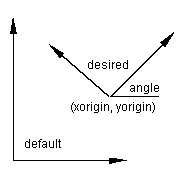 tion functions transforms latitude/longitude
co-ordinates to and from a projected co-ordinate system (x,y). proj_coord
is used to modify the origin of the projected (x,y) co-ordinate system. tion functions transforms latitude/longitude
co-ordinates to and from a projected co-ordinate system (x,y). proj_coord
is used to modify the origin of the projected (x,y) co-ordinate system.
If proj_transform would have transformed (lat,long) into (x,y) it will now transform it into: (newx,newy) = (x-xorigin,y-yorigin) if angle<>0 then it will also be rotated about the new origin.
|
| Code Sample: |
import_worldmap("GBR");

proj_type("mercator");
 #We want to work in kilometres instead of metres
proj_unit(1000);
#Our box is based 200km west and 7000km north #of the default mercator origin proj_coord(-200,7000,0); #our box is 100km by 100km xbox = 0//100//100//0//0; ybox = 0//0//100//100//0; proj_transform(xbox, ybox, "blong", "blat", "xy_to_latlong"); create Viewport page_1.viewport_1 ( XuNsecondDiagonalPoint = (75,95) %, XuNxRatio = 1, XuNyRatio = 1.2 ); create Domain page_1.viewport_1.domain_1; create Graph page_1.viewport_1.domain_1.graph_1 ( XuNgraphType = "line", XuNxData = "Long", XuNyData = "Lat" ); create Graph page_1.viewport_1.domain_1.graph_2 ( XuNgraphType = "line", XuNxData = "blong", XuNyData = "blat" ); |
| See also: |
proj_false - set/get false lat/long origin
| Syntax: | proj_false(float longOrigin, float latOrigin) |
| Description: | The projection functions
transform (longitude,latitude) co-ordinates to and from a projected
co-ordinate system (x,y). proj_false is used to modify the origin
of the (longitude,latitude) co-ordinate system.
This function can be used to avoid negative values of longitude and latitude by setting a false easting and a false northing. For example: proj_false(-180,-90);
|
| See also: |
proj_origin - set/get origin of projection
| Syntax: | proj_origin(float longOrigin, float latOrigin) |
| Description: | proj_origin is used to set
the origin of the projection.
Cartographic projections are most accurate in the area about the origin of the projection.
|
| See also: |
proj_parallels - set/get standard parrallels of a conic projection
| Syntax: | proj_parallels(float first, float second) |
| Description: | proj_parallels is used to
set/get the standard parallels of a conic projection.
A conic projection maps parallels onto concentric circles and is usually true-scale along one or two parallels called standard parallels.
|
| See also: |
proj_scale_factor - set/get scaling factor of projection
| Syntax: | proj_scale_factor(float sfactor) |
| Description: | proj_scale_factor is used
to set/get the central scale factor of a projection.
Cartographic projections always involve some form of distortion and the central scale factor can be used to compensate for this. The central scale factor is normally 1 or very close to 1.
|
| See also: |
proj_spheroid - set/get projection spheroid
| Syntax: | proj_spheroid(float major, float minor) |
| Description: | proj_spheroid is used to
set/get the projection spheroid.
|
| See also: |
proj_spheroid_select - select predefined projection spheroid
| Syntax: | proj_spheroid_select(string spheroid) |
| Description: | Selects a predefined projection
spheroid.
The earth is an ellipsoid of revolution. The radius along the polar axis is approximately 3% less than the equatorial radius. This function sets the definition of this spheroid to one of the common international standards:
|
| See also: |
proj_transform - perform projection
| Syntax: | proj_transform(float xin, float yin, string xout, string yout, string direction) |
| Description: | The va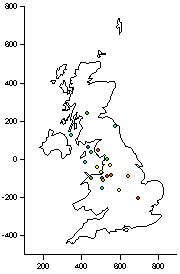 rious projection functions such as
proj_type and proj_spheroid_select are used to define the transformation
between a (longitude/latitude) co-ordinate system and a projected
(x,y) co-ordinate system. rious projection functions such as
proj_type and proj_spheroid_select are used to define the transformation
between a (longitude/latitude) co-ordinate system and a projected
(x,y) co-ordinate system.
Once this projection has been defined proj_transform can be used to perform the transformation in either direction.
For example to go from one to the other and back again: proj_transform(xin, yin, "xout", "yout","xy_to_latlong"); proj_transform(xout, yout, "xin2", "yin2"); |
| Code Sample: |
import_worldmap("GBR","full");
dataLong = normrnd(20)-3;
dataLat = normrnd(20)+54;
dataz = rnd(20);

proj_type("utm");
proj_utm_zone(30,"northern");
proj_origin(-3,54);
proj_unit(1000);

proj_transform(Long, Lat, "coastx", "coasty");
proj_transform(dataLong, dataLat, "datax", "datay");

create Viewport page_1.viewport_1
   ( XuNsecondDiagonalPoint = (75,95) %,
     XuNxRatio = 0.8,
     XuNyRatio = 1.3
   );
create Domain page_1.viewport_1.domain_1;
create Graph page_1.viewport_1.domain_1.graph_1
   ( XuNgraphType = "line",
     XuNxData = "coastx",
     XuNyData = "coasty"
   );
create Graph page_1.viewport_1.domain_1.graph_2
   ( XuNcolorData = "dataz",
     XuNgraphType = "scatter",
     XuNxData = "datax",
     XuNyData = "datay"
   );
|
| See also: |
proj_coord, proj_spheroid, proj_false, proj_origin, proj_parallels, proj_scale_factor, proj_spheroid_select, proj_type, proj_unit, proj_utm_zome |
proj_type - set projection type
| Syntax: | proj_type(string projection) |
| Description: | Set projection type.
The following projections are available:
|
| See also: |
proj_unit - set length of projected unit
| Syntax: | proj_unit(float ufactor) |
| Description: | The (x,y) co-ordinates that
the (latitude, longitude) data is projected has a unit of 1 metre.
proj_unit can be used to scale the (x,y) co-ordinates into different units:
|
| See also: |
| Syntax: | proj_utm_zone(float zone, string hemisphere) |
| Description: | Set the UTM (Universal Transverse
Mercator) zone and hemisphere.
Calling proj_utm_zone will also set the following:
|
| See also: |
putenv - set environment variable
| Syntax: | float putenv(string setting) |
| Description: | Set an environment variable
|
| Example: |
putenv("POST=myfile.ps");
|
| See also: |
.