Pointers to GUI Objects
GUI objects are always referenced using an absolute path name. The scope
command, which enables the use of relative path names, only effects graphics
objects and cannot be used on GUI objects. Pointers are a useful way to
reference GUI objects. Among their many uses, pointers enable dynamic
name creation and can simplify GSL statements. The advantage of pointers
is particularly evident when creating multiple instances of the same object
class on a parent. Multiple buttons can be added to a menu using a pointer
in a compact for loop, as
illustrated in the example below:
Example: gui_lesson3.gsa menu creation using pointers
...
prefix = "$UNIDIR/example/Gsharp/";
demoTypes = "Commercial"//"Engineering"//"Geospatial";
Commercial = "trends.gsl"//"stocks.gsl"//"portfolio.gsl";
Engineering = "flight.gsl"//"enginetest.gsl"//"polar.gsl";
Geospatial = "samples/region_mesh.gsl"//"ifremer.gsl"//"grnd_model.gsl";
create Menu gsharp_1.menubar.Demo
( XuNguiLabel = "Demo"
);
for type in demoTypes
SUBMENU = "gsharp_1.menubar.Demo." + type;
create Menu $SUBMENU
( XuNguiLabel = type
);
for demo in $type
OBJ = ObjNewName(SUBMENU + ".button_");
create Button $OBJ
( XuNguiLabel = demo strrchr(demo,"."),
XuNguiCallback = "GuiExecCB",
XuNguiCallbackData = GuiPack(prefix + demo)
);
endfor
endfor
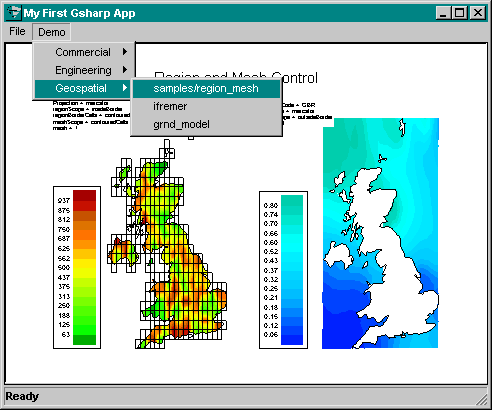
This example initializes object pointers in two ways; menu object names
are created by adding string variables, and button object names are created
inside the loop by calling the $UNIDIR/lib/libobj function ObjNewName
to append a unique object ID to the end of an object path string.
Notice how the demo program name is store in the callback data resource
for each button. The XuNguiCallbackData resource cannot be directly set
to a string since data resources require a dataset. The function GuiPack
packs the string in quotes so that a temporary dataset is created. The
callback function GuiExecCB then executes the file when the callback is
invoked. Both of these functions can be found in the library $UNIDIR/lib/libxu.gsl.
The figure below shows the GUI menu and submenu created by the example gui_lesson3.gsa.
Carry on to Dialogs