Interpolation and Contouring
In order to create a contour plot Gsharp requires the data to be a two dimensional grid. If our input data is in irregular scatter format then we can use an interpolation method to calculate a grid from it.
There are two methods of interpolating from scattered data to grid data:
-
Bilinear - may not pass through original points, supports regions and faults
-
Bivariate - passes through original points, limited to 250 input points.
Open the DataManager and from the Interpolate menu choose Bilinear. Set the output name to be grid. Set the X data to be X, Y data to be Y and Z data to be Z. Set X Grid and Y Grid to be 40. Click on OK. Gsharp creates a 40 by 40 grid of values based on the input data. The location of the grid is 40 evenly spread points with the same extremes as the input data.
Back in the canvas resize the scatter plot to fill the left hand side of the screen. Create a new viewport to fill the right. Select the viewport and then create a Graph inside it. Set the graph type to be 2D Contour. Under the data tag set Colour Grid to be "grid".
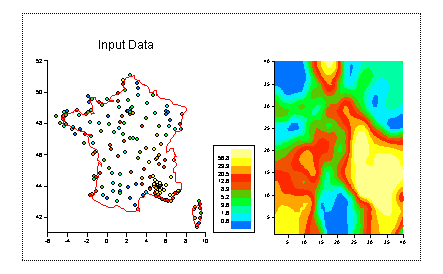
Notice that the contour plot axes go from 1 to 40. Edit the contour plot again and set X Data to be "range(X, 40)" and Y Data to be "range(Y,40)". The axes now show the correct latitude and longitude values. This is because the range(X,40) function returns 40 evenly spaced values with the same limits as X.
It is possible to only contour a grid within a given region. Edit the contour plot again(!) and go to the Region tag. Set X Data to be "regx", Y Data to be "regy" and border cells to be "contoured".
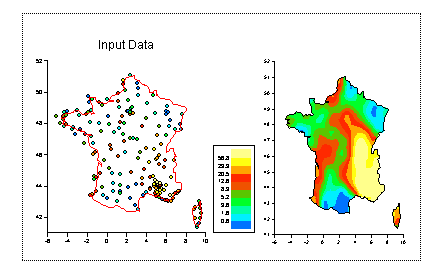
Turn on the legend for the contour plot and add a title:
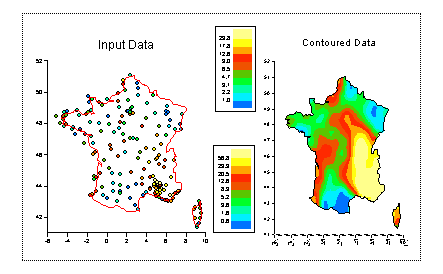
In the next step we will look at how we can control the shading scales and colour maps in our plot