Domains
The domain object is a container for one or more graphs. There are many types of domains, e.g. chart domain, contour domain, 3D domain, vector domain and polar domain.
The domain controls several important resources:
-
The limits of the plot.
-
The classes and class colors of any graphs within it.
-
The switches for graph clipping, graph stacking, reference lines and X/Y orientation.
The domain is responsive to the graphs that it contains. It will automatically change its type based on the type of the first graph added to it. It will also adjust plot limits based on the limits of the graphs that it contains.
It is possible to have more than one domain in a single viewport. This allows you to overlay a contour domain with a vector domain or to have domains with different plot limits.
Back on the canvas, select your first viewport and then click on the domain icon on the object toolbar. A pair of axes will appear in the selected viewport.
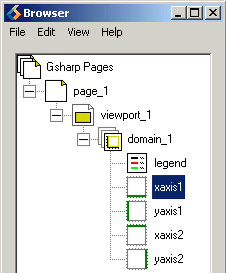 In
the browser you will notice that in addition to the domain object, four axes and
a legend object have also appeared. Axis and legend objects cannot be added or
deleted - their presence is controlled by the domain object. If, for example, a
3D line graph is added to the domain, the domain becomes a 3D domain and the
four 2D axes are replaced by three 3D axes.
In
the browser you will notice that in addition to the domain object, four axes and
a legend object have also appeared. Axis and legend objects cannot be added or
deleted - their presence is controlled by the domain object. If, for example, a
3D line graph is added to the domain, the domain becomes a 3D domain and the
four 2D axes are replaced by three 3D axes.
By default, the legend and two of the axes are disabled.
In the Browser, enable xaxis2 and yaxis2 using the pop-up menu (place the mouse over xaxis2, hold down the right mouse button and select Object Enabled, repeat for yaxis2). You should now have axes on all four sides of the viewport.
If you would like to save your work so far click on the Save icon on the command toolbar, specify the Save as type to be GSL script, the filename as backup.gsl and then click on OK (on Windows the button is labelled Save).
We are now ready to plot some data.