Reading Data
Overview
There are many ways of getting data into Gsharp. These include:
-
ASCII files
-
Binary files
-
Databases (including ODBC)
-
Excel files and CSV files
-
Paste Excel cells from clipboard
-
Via user-defined C or FORTRAN routines linked into Gsharp
For the moment though we will just use the most popular - ASCII files.
Our Data
We shall start by trying to plot the following data from simple.dat in a number of ways:
Girls Boys 0.645131683349609 0.74063835144043 0.896959495544434 1.26882762908936 1.43910388946533 1.18691997528076 1.7170108795166 1.31526985168457 2.09462928771973 1.79861831665039 2.07529697418213 1.57551441192627 2.59367198944092 1.41292209625244 2.41288833618164 1.51675491333008 2.79783477783203 1.77204933166504 3.31904888153076 1.88133144378662 |
Any ASCII file with data in columns can be read using Gsharp's report reader. Gsharp will store each column in a separate dataset and use the column header for the dataset name
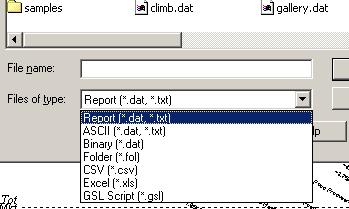 Click on the File Open icon of the DataManager
Make sure that the file type is set to "Report (*.dat, *.txt)", read in simple.dat. The following message should appear:
Import Report: 10 values read into Girls, Boys
Look at the data using the DataEditor to make sure it was read successfully.
You have successfully read your data into Gsharp - now you are ready for Step 2 - Creating Graphics