Print Setup
The Print Setup w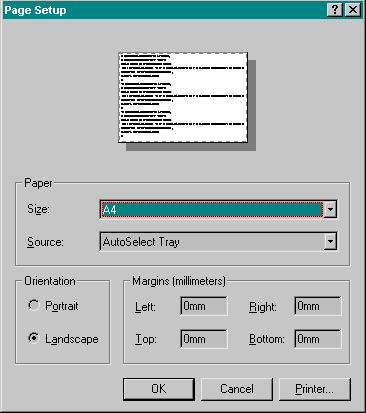 indow
is used for selecting a printer and for positioning the plot on the page.
The plot is printed through the Windows print system. If no printers exist
you must exit Gsharp, set-up a printer and then restart Gsharp again.
indow
is used for selecting a printer and for positioning the plot on the page.
The plot is printed through the Windows print system. If no printers exist
you must exit Gsharp, set-up a printer and then restart Gsharp again.
The Print Setup dialog includes options to set the page size, the printer tray, the orientation of the page and the margins.
To select a different Windows printer, click on Printer ...
Once the printer has been setup you can print using the print icon on the command toolbar or using the Print option of the File menu.
It also possible to:
- Output to file-types such as GIF, JPEG, TIFF, PostScript and CGM using the Output Image option.
- Send the plot to the Windows Clipboard using the copy icon or by pressing Ctrl-C.
Return to Gsharp Reference Manual.