Output Image
To create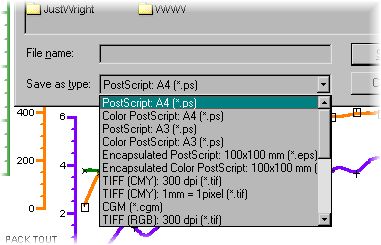 an image file (or any of the devices supported by Gsharp) use the Output
Image option on the File menu.
an image file (or any of the devices supported by Gsharp) use the Output
Image option on the File menu.
Modify the Save as type field to the format that you require. Specify a file name and then click on Save.
- The size of the
image is either fixed and will be included in the Save as type field
(e.g. most PostScript drivers are set to A4) or the image is controlled
by the size of the page. The default resolution of the image types is
150 dots per inch or 5.9 pixels for every mm of page.:
To set the size of the page use the Page Setup option of the File menu. Set the format to custom and the size to be the required size. e.g. to create a JPEG image 400 pixels wide by 300 pixels high use the Save as type: "JPEG" and then set the page size to be 400/5.9 = 67.8 mm by 300/5.9 = 62.34 mm.
- If you are looking
for a good format to transfer your plot to Microsoft Word then we have
the following recommendations:
- Encapsulated PostScript will print well but you will not be able to see the plot on the screen
- CGM will be visible on the screen and will also print well, but you need to make sure that your version of word can read CGMs.
- If you are looking for a good format to use for a web page then we recommend GIF. This has no loss of quality and has a small file size.
- To configure the list of devices that are available, edit the Gsharprc.gsl in file in %UNIDIR%\base
GSL programmers can control the output of images using the object hardcopy.
The following function from $UNIDIR/lib/libhtml.gsl demonstrates this:
function make_image(float npx, float npy, string filename)

  string type;

  type = strrchr(filename,'.');
  if type = '.gif' then
    hardcopy.XuNdevice = 'ggifl8';
  elif type = '.png' then
    hardcopy.XuNdevice = 'gpngl8';
  elif type = '.jpg' then
    hardcopy.XuNdevice = 'gjpgi8';
  elif type = '.tif' then
    hardcopy.XuNdevice = 'gtifi8';
  elif type = '.eps' then
    hardcopy.XuNdevice = 'hcposteps';
  else
    echo('Unrecognised file extension: '+type);
    return;
  endif

  hardcopy.XuNplotFileName = filename;
  set page_1
   ( XuNlockToDevice = undef,
     XuNformat = 'custom',
     XuNsize = (npx,npy),
     XuNmarginLeft = 0,
     XuNmarginRight = 0,
     XuNmarginTop = 0,
     XuNmarginBottom = 0
   );
  print;
endfunction |
Return to Gsharp Reference Manual.