cat - send the contents of a file to stdout
|
Syntax: |
cat(string filename) |
|
|
Description: |
Send the contents of filename to stdout. Can be used by Gsharp Web Edition to output a GIF image. |
|
|
Code sample: |
imgfile = getenv("GsharpTmpFilesActualDir")+"zoom"+getpid()+".gif";

make_image(500, 400, imgfile);

echo("Content-type: image/gif"//"");

cat(imgfile);
remove(imgfile);
|
|
childrenof - children of an object
|
Syntax: |
string childrenof(string parent) |
|
Description: |
childrenof returns the children of parent as a string array.
|
|
Code sample: |
function ExpertOptionsCB(string o, string d, float r)
  string MENU, OBJ;
  MENU = "gsharp_1.menubar.User";
  for OBJ in MENU+"."+childrenof($MENU)
    if (typeof($OBJ)<>"Button")  continue;
    if ($(OBJ).XuNuserData=undef)  continue;
    $(OBJ).XuNguiSensitive = ($(OBJ).XuNuserData=d);
  endfor
endfunction

if exists(gsharp_1.menubar.User) destroy gsharp_1.menubar.User;
create Menu gsharp_1.menubar.User;
create Button gsharp_1.menubar.User.Expert
 ( XuNguiLabel = "Switch on expert options",
   XuNguiCallback = "ExpertOptionsCB",
   XuNguiCallbackData = '"Expert"',
   XuNuserData = "Novice"
 );
create Button gsharp_1.menubar.User.Novice
 ( XuNguiLabel = "Switch off expert options",
   XuNguiCallback = "ExpertOptionsCB",
   XuNguiCallbackData = '"Novice"',
   XuNguiSensitive = false,
   XuNuserData = "Expert"
 );
create Separator gsharp_1.menubar.User.Separator;
create Button gsharp_1.menubar.User.Easy1
 ( XuNguiLabel = "Easy"
 );
create Button gsharp_1.menubar.User.Diff1
 ( XuNguiLabel = "Puzzling",
   XuNuserData = "Expert",
   XuNguiSensitive = false
 );
create Button gsharp_1.menubar.User.Diff2
 ( XuNguiLabel = "Tricky",
   XuNuserData = "Expert",
   XuNguiSensitive = false
 );
|
|
See also: |
|
Syntax: |
const type x[nx,ny,nz] = value |
|
|
Description: |
To specify that a dataset is constant and cannot be modified precede the declaration of the dataset with the keyword const and follow it with = value, where value is the required value.
|
|
|
Examples: |
const float n = 10; | |
| const string WORK.Templates = ("A", "B") // ("C", "D"); | ||
|
See also: |
||
continue - continue with next iteration of loop
|
Syntax: |
continue |
|
Description: |
Continue with the next iteration of a for or while loop
|
|
Code sample: |
for PTR in all("Viewport")
  if ($(PTR).XuNuserData="keep")  continue;
  echo("Say goodbye to "+PTR);
  destroy $PTR;
endfor
|
|
See also: |
|
Syntax: |
float cos(float x) |
|
|
Description: |
|
|
|
Examples: |
x |
cos(x) |
|
-π |
-1 |
|
|
See also: |
||
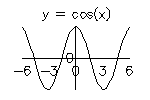 Returns
the cosine of each member in x.
Returns
the cosine of each member in x. cosh - return hyperbolic cosine
|
Syntax: |
float cosh(float x) |
|
|
Description: |
|
|
|
Examples: |
x |
cosh(x) |
|
-1 |
1.54308 |
|
|
See also: |
||
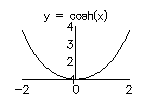 Returns
the hyperbolic cosine of each member in x.
Returns
the hyperbolic cosine of each member in x. count - number of valid elements
|
Syntax: |
float count(any x) |
|
Description: |
Returns the number of valid elements in x.
|
|
See also: |
countx - number of valid elements in each column
|
Syntax: |
float countx(any x) |
|
Description: |
Returns the number of valid elements in each column of x.
|
|
See also: |
create - create an object's and set its resources
|
Syntax: |
create objectType object (resource = value, resource = value, ...) |
|
Description: |
Create an object's resources.
|
|
Code sample: |
create Viewport page_1.viewport ( XuNfirstDiagonalPoint = (10,10), XuNsecondDiagonalPoint = (90,90) ); |
|
See also: |
crosssum - calculate sum of 2D irregular points within each gridbox
|
Syntax: |
float crosssum(float x, float y, float z, float xclasses, float yclasses) |
|
Description: |
Returns the crosstable of x and y using the sum of z and the intervals defined by xclasses and yclasses.
|
|
Code sample: |
lat=rnd(100);  long=rnd(100);  sales=rnd(100)*100;
classes = .25//.5//.75;
turnover = crosssum(long, lat, sales, classes, classes); numSales = crosstable(long, lat, sales, classes, classes); create Viewport page_1.viewport;
create Domain page_1.viewport.domain_2
( XuNshadingScale = "cyanYellowRed"
);
set page_1.viewport.domain_2.legend
( XuNobjectEnabled = true
);
create Graph page_1.viewport_2.domain_2.graph_2
( XuNgraphType = "grid",
XuNcolorDataGrid = "turnover",
XuNxData = "0//classes//1",
XuNyData = "0//classes//1"
);
|
|
See also: |
crosstable, histosum, histogram, Irregular Grid graph type |
crosstable - count number of 2D irregular points within each gridbox
|
Syntax: |
float crosstable(float x, float y, float xclasses, float yclasses) |
|
Description: |
Returns the crosstable of x and y using the intervals defined by xclasses and yclasses.
|
|
See also: |
current_folder - return current folder
|
Syntax: |
string current_folder() |
|
Description: |
Returns the current folder.
|
|
Code sample 1: |
CURFOLD = current_folder();
scope DATA;
import_report("mydata.dat");
scope $CURFOLD;
|
|
Code sample 2: |
FOLD = current_folder(); if exists($(FOLD).X) destroy X; |
|
See also: |
current_object, scope |
current_object - return current object
|
Syntax: |
string current_object() |
|
Description: |
Returns the full path name of the current object. The current object is set using the scope command or by selecting it in the browser or on the canvas. |
|
Code sample 1: |
function CanvasCB(string o, string d, float r) string OBJ; if r<>XuCR_DOUBLE_CLICK return; OBJ = tokenize(current_object(),"."); if size(OBJ)=1 return; ViewportSelected(OBJ[1]+"."+OBJ[2]); endfunction |
|
See also: |
current_page - return current page
|
Syntax: |
string current_page() |
|
Description: |
Returns the current page. The current page is the page containing the current object. See above. |
|
Code sample 1: |
function AddViewport()
  string PAGE;
  PAGE = current_page();
  create Viewport $(PAGE).view1
   ( XuNfirstDiagonalPoint = (10,10),
     XuNsecondDiagonalPoint = (90,90)
   );
endfunction
|
|
See also: |