What's new in AVS/Express 6.0?
Network Editor Reorganized
The Network Editor has been reorganized. The goal of the reorganization was to reduce the differences between the Developer's Edition and the Visualization Edition of AVS/Express. The Main and Accessories page of the Visualization Edition are more like their counterparts in the Developer's Edition. The Visualization Edition now includes a Visualization page similar to the one in the Developer's Edition.
Illuminated Lines
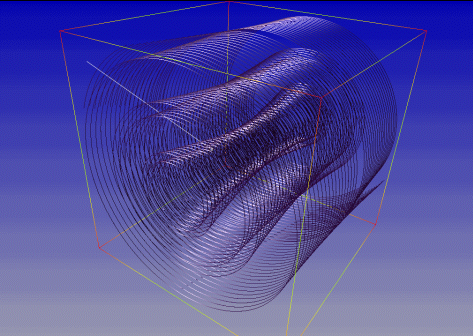
Illuminated lines are a new method for using a dynamic texture map on 3D polylines to represent field streamlines for the purpose of visualizing continuous fluid dynamics fields. The method combines stream lines and particle animation into one hybrid technique, and employs texture display on lines to represent full 3D lighting, motion and 3D flow structure in one view. The technique exploits texture graphics systems in common use for games, and achieves high graphics efficiency during animation. (More...)
CGNS Reader
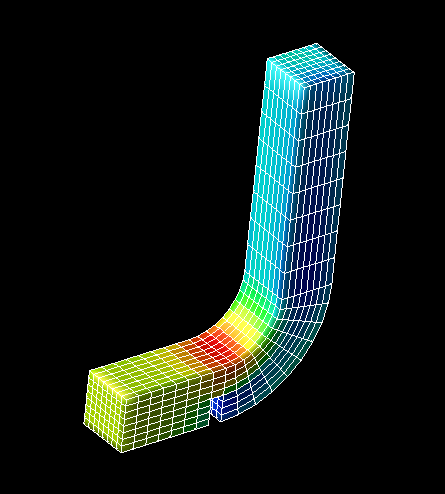
This new reader allows reading of CGNS files. CGNS stands for CFD General Notation System, which is is designed to be a standard file format for Computational Fluid Dynamics data. More information about CGNS can be found at the CGNS Web site.(More...)
MPEG Encoder Improved
The new AVS/Express MPEG encoder has been improved. Both the encoding quality and encoding speed have been enhanced. The existing image_capture macro has been extended to include new GUI controls to enable the user to control some of the MPEG encoding parameters. AVI file writing is now supported on UNIX. (More...)
General-purpose NetCDF Field Import/Export
AVS/Express now has the ability to read and write fields from standard netCDF files. These new facility is better suited for data import and export than the AVS/Express' older netCDF reader/writer. The older version is still maintained for backwards compatibility. (More...)
Improved volume_render macro
The volume_render macro includes several enhancements. Among these are:
- New Datamap minimum and maximum sliders allow overriding of default
values for the data range, particularly useful for volume rendering
16 and 12 bit datasets.
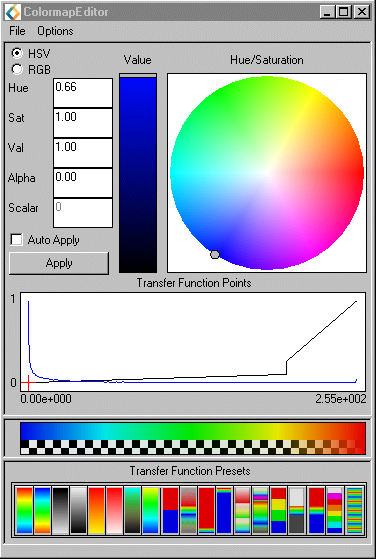
- Improved datamap/colormap editor is now easier to use and understand, and includes a legend that directly depicts both the colors and the transparencies of the datamap being edited.
- New examples demonstrate various way to use the volume renderer.
 Enhanced
Color Map Editor
Enhanced
Color Map Editor
AVS/Express 6.0 introduces an enhanced colormap editor featuring an improved user interface. Some of the improvements include:
- Automatic extraction of available histogram data from any input Gdobject
- Colormap preset buttons for quick selection of an initial colormap
- A checkerboard area at the bottom of the color bar that previews the effect of the alpha channel (transparency).
(More...)
Two-pass Transparency
AVS/Express 6.0 introduces a new, two-pass method of handling transparency that significantly improves the visual quality of transparent objects for most scenes. Two-pass Transparency is only used with the OpenGL renderer. AVS/Express 5.1 could generate of artifacts when rendering transparent polygons.
The rendering of transparent objects can be useful in a number of visualization situations. In some cases a transparent shell would be useful in showing the contents of a object. An example of this would be a medical visualization where the surface of a body would be visible as a transparent object. This can help give context to the rest of the visualization.
Visual Quality Default Settings
The default light position (light source transformation matrix) is now at 45 degrees to the upper left. The old default was to have the light positioned from the eye point. The old behavior can be restored by setting the environment variable XP_OLD_LIGHTS.
Specular highlights are now turned on by default. This will give objects a shiny appearance.
Plot3D Reader Extended
The PLOT3D reader, taken from the IAC, can now read more types of PLOT3D files than before. It replaces the older Plot3d_Multi_Block macro.
Read Image To Volume
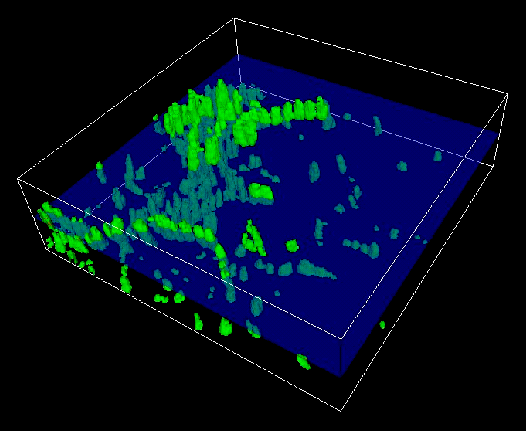
This popular IAC module (a.k.a. Build3D_2 Reader) reads a sequence of image files (e.g. TIF, JPG) representing slices of a 3D volume. Based on these slices, the module constructs a 3D volume field. A sample output is shown below. (See Read_Img2Vol, adjust_slice_spacing, DVread_img2vol, DVadjust_slice_spacing.)
Off-screen Rendering (UNIX)
AVS/Express now has the ability to run in a special off-screen mode without creating windows. When AVS/Express is started with the -offscreen flag, no visible windows will be created. (More...)
Array Size Limit on 64-Bit Platforms
AVS/Express 6.0 improves support on 64-bit platforms for large arrays by raising the size limit to 2 giga-elements. For example, a 1000 x 1000 x 1000 array of floats consumes 4 billion bytes of storage and exceeds the limit of previous versions of AVS/Express. Since it has only 1 billion array elements, it does not exceed the current (version 6.0) limit (1 GB == 2^30 bytes == 1,073,741,824 bytes).
In AVS/Express 5.1 on 64-bit platforms, users could load data sets larger than 2GB, but a limitation prevented any single array from being larger than 2GB.
Autoload
Autoload is a new mechanism that allows easy installation of modules and libraries. Users will be able to extend AVS/Express' functionallity without having to construct and compile a project. This greatly simplifies access to downloaded IAC modules. For example, when autoloaded IAC modules become available the procedure for installing them could be as simple as unpacking a zip or tar file. (More...)