mask - return a subset of an array
| Syntax: | any mask(any x, float condition) |
| Description: | Return all elements of x
for which condition is true.
|
| Code sample 1: | x = rnd(100); y = rnd(100);
#Find the elements of x that are less than 0.1 for i in lineNums |
| Code sample 2: | #find all arguments containing
".gsl"
argv = "Gsharp" // "bob.gsl"
// "dave.gsl" // "-bs"; |
| See also: | if |
| Syntax: | string match(string t, string pattern) | |
| Description: | match
is included for backwards compatibility - it has been replaced by
strstr.
match returns a substring of t matching the specified pattern.
|
|
| Examples: | pattern | match("abcdef",pattern) |
| "*
" " ? * " "a ? * " "b*" |
"abc" "bde" "ace" undef |
|
| See also: | strstr, strchr, strrchr | |
| Syntax: | float matdet(float matrix) | |
| Description: | Return determinant of a matrix. | |
| Examples: | matrix | matdet(matrix) |
| a b c d |
ad - bc | |
| See also: | matinv, matmul, matsolve | |
matinv, matsolve - matrix inverse and matrix solve
| Syntax: | float matinv(float
matrix) float matsolve(float M, float D) |
||||||||
| Description: | matinv returns the
inverse of matrix. matsolve solves simultaneous equations. If M is a matrix, N is matinv(M) and I is the identity matrix (M.I=M and I.M=M) then:
|
||||||||
| Examples: |
To solve the simultaneous equations:
write as M.x = d where
M = (3,2)//(1,-1); d = 4//6; #x = matmul(matinv(M),d); x = matsolve(M,d); |
||||||||
| See also: | matdet, matmul, matsolve |
| Syntax: | float matmul(float M, float N) |
| Description: | Return the matrix multiplication
of M and N
|
| See also: | matdet, matinv, matsolve |
| Syntax: | float max(float x) | |
| Description: | Return maximum value of x | |
| Examples: | x | max(x) |
| 1 3 2 |
3 | |
| Code sample 1: | x = rnd(100);
y = rnd(100);
echo("The highest value of y can be found where
x equals:"); |
|
| See also: | min, max2, maxx | |
max2 - maximum of corresponding elements
| Syntax: | float max2(float a, float b) | ||
| Description: | Return the maximum values of corresponding elements of a and b | ||
| Examples: | a | b | max2(a,b) |
| 1 1 3 4 |
4 3 2 1 |
4 3 3 4 |
|
| Code sample 1: | x = rnd(100); x = max2(x,0.5); |
||
| See also: | min, max, maxx | ||
| Syntax: | float maxx(float x) | |
| Description: | Return the maximum
value of each column of x
|
|
| Examples: | x | maxx(x) |
| 1 3
5 2 4 6 |
2 4 6 |
|
| See also: | max | |
member - check existence of dataset
| Syntax: | float member(string dataset) |
| Description: | Returns true if dataset
can be found in the current folder
|
| Code sample: |
if not member("grid") grid = bilinear(x,y,z,20,20);
|
| See also: | exists |
message_level - set which messages to suppress
| Syntax: | message_level(float errors, float warnings, float information, float user) |
| Description: |
Exactly the same as set_messages() |
| See also: | set_messages |
middayrange - return range of dates
| Syntax: | date middayrange(date d, float s) |
| Description: | identical to dayrange |
| See also: | dayrange |
midhourrange - return range of times
| Syntax: | time midhourrange(string times, float hstep) | |
| Description: | Return a range of times which can be found within the extremes of times and are an integer multiple of hstep hours since 00:30:00 | |
| Example: | times | midhourrange(times,3) |
| 9:02:01 12:00:00 19:02:01 |
9:30:00 12:30:00 15:30:00 18:30:00 |
|
| See also: | ||
midminuterange - return range of times
| Syntax: | time midminuterange(string times, float mstep) | |
| Description: | Return a range of times which can be found within the extremes of times and are an integer multiple of mstep minutes since 00:00:30 | |
| Example: | times | midminuterange(times,7) |
| 9:06:15 9:29:59 |
9:06:30 9:13:30 9:20:30 9:27:30 |
|
| See also: | ||
midmonthrange - return range of dates
| Syntax: | date midmonthrange(string dates, float dstep) | |
| Description: | Return all the month middles that can be found within the extremes of dates starting with the first one and then with a step of dstep | |
| Example: | dates | midmonthrange(dates,2) |
| 29/6/1970 25/12/1970 |
16-JUL-1970 16-SEP-1970 16-NOV-1970 |
|
| See also: | ||
midquarterrange - return range of dates
| Syntax: | date midquarterrange(string dates, float dstep) | |
| Description: | Return all the mid quarter dates that can be found within the extremes of dates starting with the first one and then with a step of dstep | |
| Example: | dates | midquarterrange(dates,2) |
| 1/4/2000 25/12/2000 |
16-MAY-2000 16-NOV-2000 |
|
| See also: | ||
midsecondrange - return range of times
| Syntax: | time midsecondrange(string times, float mstep) |
| Description: | Identical to secondrange |
| See also: |
midweekrange - return range of dates
| Syntax: | date midweekrange(string dates, float dstep) | |
| Description: | Return all the Thursdays that can be found within the extremes of dates starting with the first one and then with a step of dstep | |
| Example: | dates | midweekrange(dates,2) |
| 29/6/70 2/8/70 |
02-JUL-1970 16-JUL-1970 30-JUL-1970 |
|
| See also: | ||
midyearrange - return range of dates
| Syntax: | date midyearrange(string dates, float dstep) | |
| Description: | Return all the July 2nd's that can be found within the extremes of dates starting with the first one and then with a step of dstep | |
| Example: | dates | midyearrange(dates,2) |
| 29/6/70 2/8/73 |
02-JUL-1970 02-JUL-1972 |
|
| See also: | ||
| Syntax: | float min(float x) | |
| Description: | Return minimum value of x | |
| Examples: | x | min(x) |
| 1 3 2 |
1 | |
| Code sample 1: | x = rnd(100);
y = rnd(100);
echo("The lowest value of y can be found where
x equals:"); |
|
| See also: | max, min2, minx | |
min2 - minimum of corresponding elements
| Syntax: | float min2(float a, float b) | ||
| Description: | Return the minimum values of corresponding elements of a and b | ||
| Examples: | a | b | min2(a,b) |
| 1 1 3 4 |
4 3 2 1 |
1 1 2 1 |
|
| Code sample 1: | x = rnd(100); x = min2(x,0.5); |
||
| See also: | min, minx | ||
minutenumber - return minute part of a time
| Syntax: | float minutenumber(string t) | |
| Description: | Return the minute
part of a time dataset t.
|
|
| Example: | t | minutenumber(t) |
| 12:00:00 14:59:59 |
00 59 |
|
| Sample code: |
#This function calculates the angles of the hands of a clock function set_hands() T = time; SecondHand = secondnumber(T)*6; BigHand = (360*minutenumber(T)+SecondHand)/60; LittleHand = (360*hournumber(T)+BigHand)/12; endfunction |
|
| See also: | ||
minuterange - return time range
| Syntax: | time minuterange(string times, float hstep) | |
| Description: | Return a range of times which can be found within the extremes of times and are an integer multiple of hstep minutes since midnight | |
| Example: | times | minuterange(times,6) |
| "00:3:20" "00:21:21" |
00:06:00 00:12:00 00:18:00 |
|
| See also: | ||
| Syntax: | float minx(float x) | |
| Description: | Return the minimum
value of each column of x
|
|
| Examples: | x | minx(x) |
| 1 3
5 2 4 6 |
1 3 5 |
|
| See also: | min | |
mod - modulus - remainder from integer division
| Syntax: | float mod(float x, float y) | |
| Description: | Returns the remainder
after integer division of x by y.
For example: mod(1989,100) = 89
|
|
| Examples: | x | mod(x,2) |
| -3 -2 -1 0 1 2 3 |
-1 0 -1 0 1 0 1 |
|
| Code sample: |
years = yearnumber(dates); years2digits = mod(years,100); |
|
| See also: | div | |
monthnumber - extract month number from a date dataset
| Syntax: | float monthnumber(date d) | |
| Description: | Extract the month number of each element of d | |
| Examples: | d | monthnumber(d) |
| 13-MAR-2000 14-APR-2000 |
3 4 |
|
| Sample code: |
#This list of dates is missing the year

A1 = "13/9" // "2/10" // "1/1" // "5/5" //
     "12/8" // "25/12" // "4/2";
mydates = dateformat1(A1+"/98"); dd = daysince(mydates); offset = accum(diff(dd)<0); d = daynumber(mydates); m = monthnumber(mydates); y = yearnumber(mydates)+offset; mydates = todate(y,m,d); |
|
| See also: | todate, daynumber, yearnumber | |
monthrange - return range of dates
| Syntax: | date monthrange(string dates, float dstep) | |
| Description: | Return all the first days of the month that can be found within the extremes of dates starting with the first one and then with a step of dstep | |
| Example: | dates | monthrange(dates,2) |
| 29/6/1970 25/12/1970 |
01-JUL-1970 01-SEP-1970 01-NOV-1970 |
|
| See also: | ||
moveavg - return moving average
| Syntax: | float moveavg(float x, float nx) | |
| Description: | Return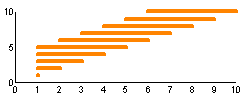 a moving average of x. The value returned is an average of
each element and the nx-1 elements before it.
a moving average of x. The value returned is an average of
each element and the nx-1 elements before it.
|
|
| Example: | x | moveavg(x,3) |
| 1 2 3 4 5 |
1 1.5 2 3 4 |
|
| Sample code: |
#A function where the value returned is an average of each
#element and the nx-1 elements around it.
#Special treatment is performed at the beginning and the end
function float movingavg(float x, float nx) float n1, n2, a; n1 = nint(nx/2); n2 = size(x)+n1-1; x = x//repeatx(undef,nx); a = moveavg(x,nx); return slicex(a,n1:n2); endfunction |
|
| See also: | ||
| Syntax: | float movesum(float x, float nx) |
| Description: | Return a moving sum of x.
The value returned is the sum of each element and the nx-1
elements before it.
See moveavg for details |
| See also: |