 There
are 2 new features for Image
Capture.
There
are 2 new features for Image
Capture. There
are 2 new features for Image
Capture.
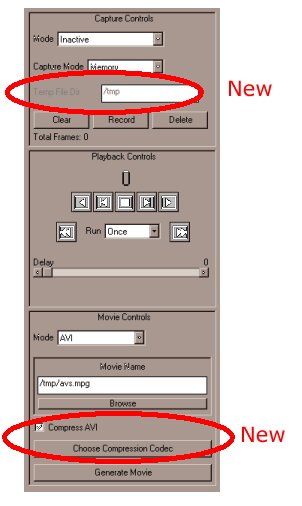
When the capture mode is set to Disk, the user may specify which directory to store the temporary images captured while recording. When Disk mode is selected the type in box for Temp File Dir becomes available.
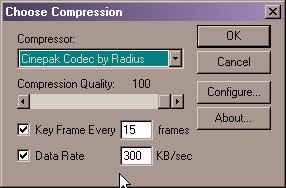
In both Windows and UNIX, the Image Capture module now contains the means to compress AVI files. In Windows, you have the ablity to choose the compression type as well as the settings. When the Movie Control Mode in the Windows version is selected to AVI, 2 new options are given. The first is a check box which asks if you wish to compress the AVI. If this is check the second button to choose the Compression Codec becomes available. By pressing this button a pop up screen comes up with a list of compressors that are available on the users machine. The user can then press configure to set the compression to compressor they wish.
In the UNIX version of this there is one built-in codec. The built-in codec emulates the Windows codec known as "AVIzlib".
Writing uncompressed AVI files in AVS/Express 6.1 will be will be faster than in 6.0 for both Unix and Windows.